Set up PowerPoint and the Visual Basic Editor
Before you start to write VBA code in PowerPoint, you'll want to set up PowerPoint itself and the VBA Editor (also known as the Integrated Development Environment or IDE) correctly. Here's how:
This tutorial and site was put together some years back, before Office 2007 with its Ribbon interface came out. If you're running Office 2007 or later, you may have a bit of trouble finding the VB editor. So here's a little trick:
Open a presentation. Press ALT+F11
That'll open the VB edtor in any version of PowerPoint.
OK. Onward.
PPT 2003 and previous: Display the VB Toolbar
- Start PowerPoint and choose View, Toolbars.
- Click Visual Basic to put a checkmark next to it if there's not one there already. The Visual Basic (VB) toolbar appears.

The VB Toolbar has buttons to:
- Run macros
- Record macros
- Change your Security settings
- Start the IDE (editor)
- Display the Controls toolbox
- Start Microsoft Script Editor (if you've installed it)
Later versions of PowerPoint can have a Developer tab on the Ribbon. In 2007, you can set this via Office Button | PowerPoint Options | Popular and put a check next to "Show Developer tab in the Ribbon". In 2010, you must customize the developer tab onto the ribbon.
Some of the most commonly used commands are on the Developer tab, but there's no macro recorder. Microsoft eliminated it in PowerPoint 2007.
PPT 2003 and previous: Security Settings
- Click Security on the VB toolbar or choose Tools, Macro, Security...
- On the Security Level tab of the Security dialog box, click Medium or Low, then click OK.
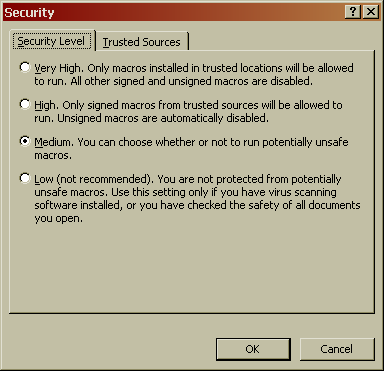
Note: If you choose Medium, PowerPoint alerts you whenever it opens a presentation that includes VBA code (macros) and lets you choose to enable the code or not.
If you choose Low, PowerPoint enables the code without asking. Bad choice if you get presentations from people you don't know and trust. If there are macros in them, you'll want some warning.
If you choose High or Very High, your code will be disabled. Bad choice if you're writing code.
All versions: Visual Basic Editor (IDE)
Start a new blank presentation. PowerPoint stores VB code in PPT files so it won't let you open the VB Editor unless there's a presentation open. Luckily, the IDE hasn't changed much in 2007/2010 so we can get by from here without all these
Interruptions
Start the VB Editor
- Click Visual Basic Editor on the VB toolbar (it's the button to the right of Security) or
- Choose Tools, Macro, Visual Basic Editor or
- Press Alt+F11
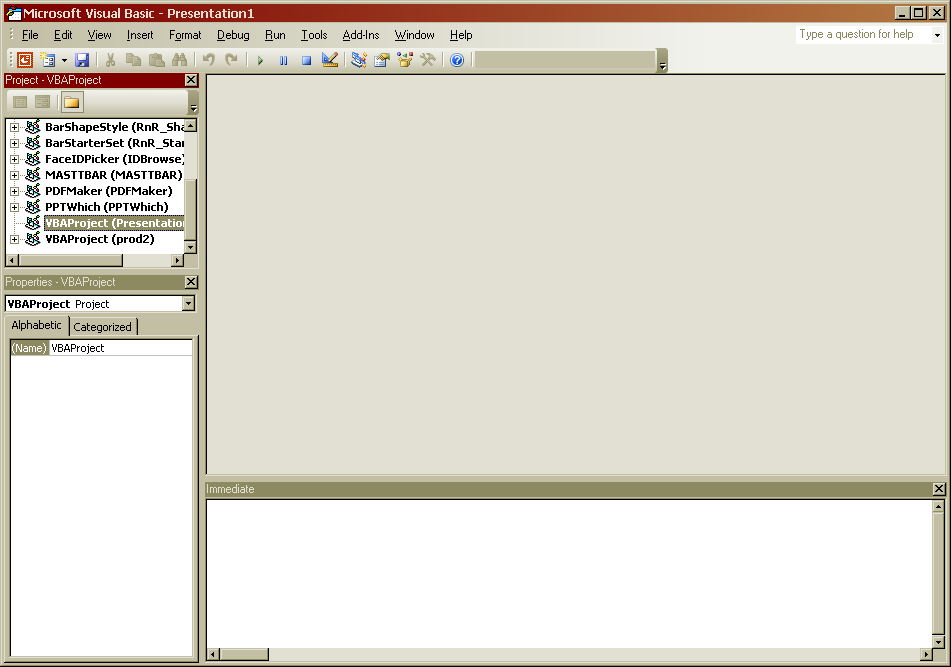
Yours will only show one "project" in the Project window on the left instead of the zillions of them you see here. That's normal.
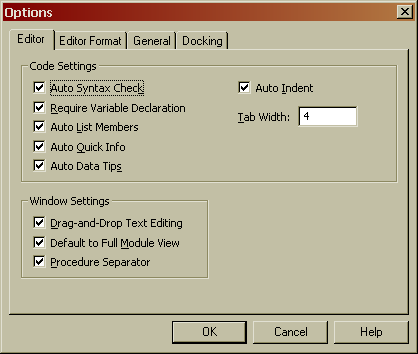
- In the VB Editor, choose Tools, Options.
- Go to the Editor tab and set it up as shown (basically, put checkmarks next to EVERYTHING)
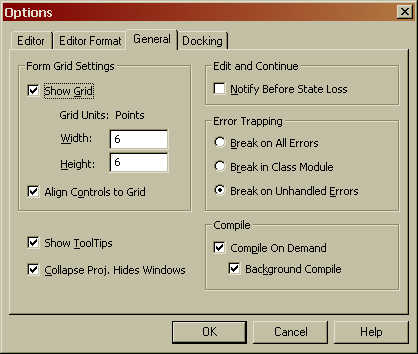
- Go to the General tab
- Put a checkmark next to "Show ToolTips" (aka "We'll take all the help we can get, thanks").
- Click "Break on Unhandled Errors" in the "Error Trapping" area.
- The rest of the options aren't too critical; set them as shown if you like.
The Editor Format tab contains options for text formatting in the IDE.
The Docking tab has options for the way the various IDE windows dock to one another.
Explore them if you like, but we're not concerned with their settings.
Finally, choose View, Toolbars and put a check next to Edit and Debug. The Edit and Debug toolbars will appear. Drag them by the title bar until they dock under the VB Editor's main menu bar, in the same area as the Standard toolbar. It should look something like this:

But you didn't come here to learn to set up a code editor, you came to learn how to make code, right?
So click Next to move on to the next section and we'll do just that.